For Mac · PDF, EPUB, Word, Kindle, and more

Read your own books with an AI that stays on the page.

Open a file you already own. Ask about the line in front of you, and get an answer grounded in that paragraph — with a link straight back to it. The more you read, the better it fits you.

Download for Mac — free to start

macOS 14.0+, Apple Silicon. No sign-up to start.

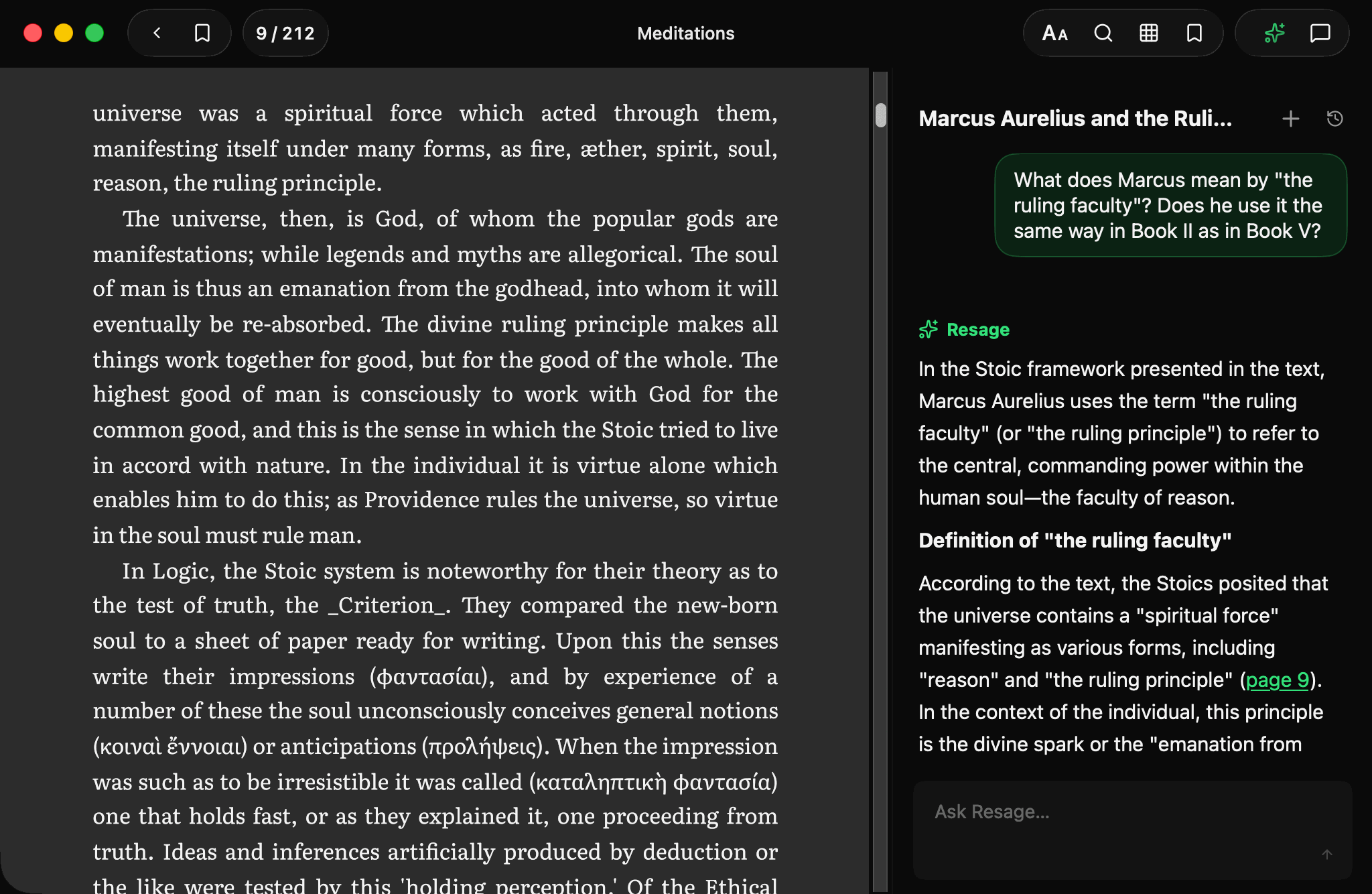
Resage on a Mac: Meditations open on the left, and on the right an answer about the current page citing page 9 as a link

Day one

A calm reader, with someone to think alongside.

Not a chatbot with a file attached. A real, full-page ebook you read yourself — with help that stays out of the way until you want it.

Reads alongside you

Turn the pages yourself, like any good ebook. Ask about the page you're on from the bar at the bottom — no commands, no menus to learn.

Anchored to your file

Answers are grounded in the actual text in front of you — not a model's vague memory of it. When it isn't sure, it says so instead of making things up. It matters most with the classics.

Jump straight to the source

When an answer points to a page or a passage, it's a link. Tap it and the reader jumps right there — follow the thread without losing your place.

One tap to go deeper

A faint ✦ at the end of a line is the only mark on the page. Tap it to open a discussion about exactly that sentence. Quiet, and never interrupting your reading.

On the page

Ask about any line.

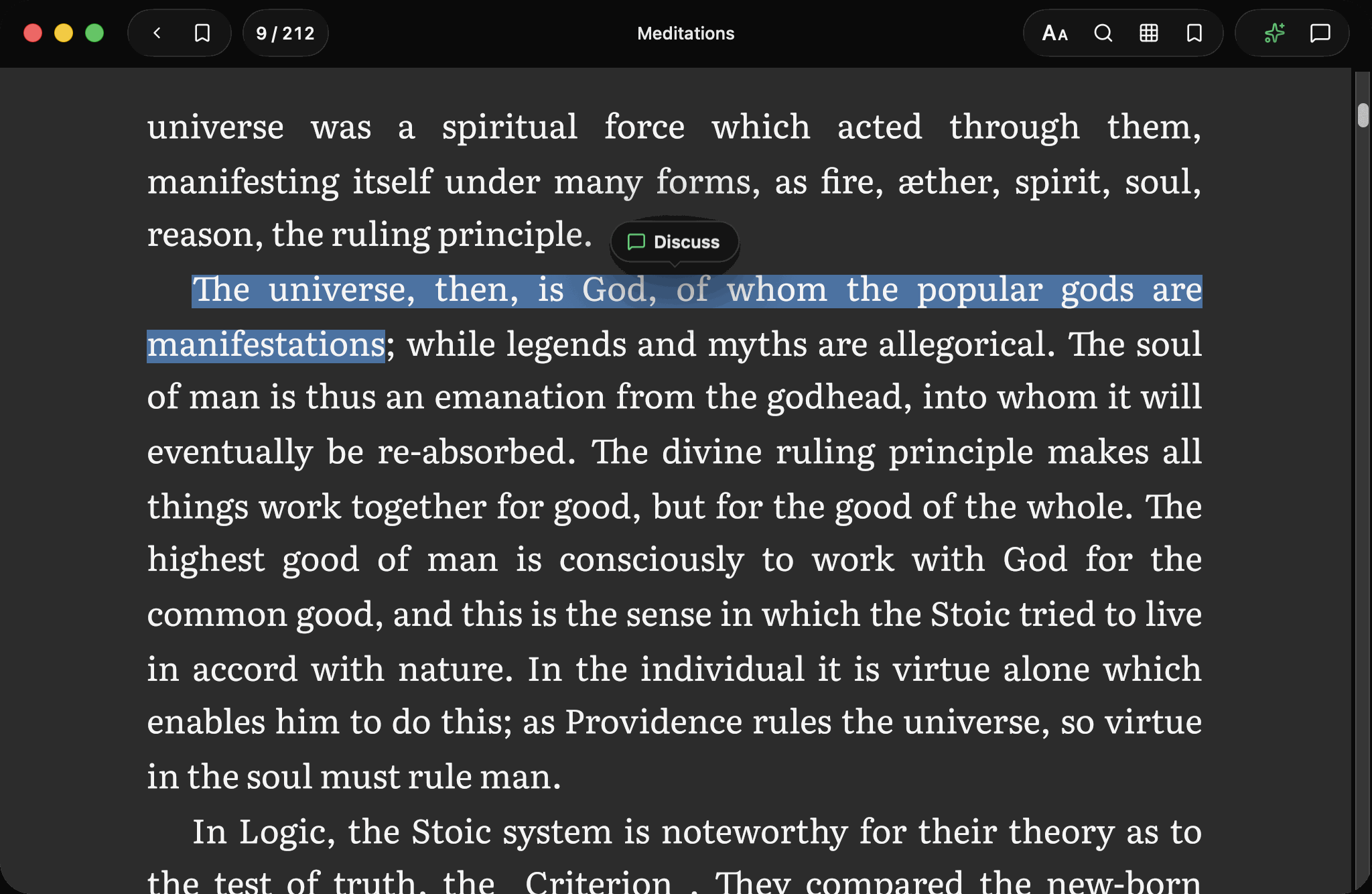
Select a sentence and discuss it right there — the passage goes across with your question, so you never have to describe what you’re looking at.

Resage select-to-discuss — highlight a sentence and a Discuss pill appears

The problem

AI can answer anything.
It just doesn't remember you.

It doesn't revolve around you.

Generic AI keeps no picture of you as a reader — your habits, your level, what you already know. Same explanation for everyone, forever.

It's a general-purpose model, not built for reading.

A chatbot with a file attached: no page you're on, no guardrails against making things up, no sense of how deep to go for you.

The conversation trap.

Start a new chat and it forgets everything you covered. Stay in one endless chat and it drowns in its own context, getting slower and dumber.

Your knowledge stays fragmented.

A dozen files, a dozen silos. Nothing connects what you learned in one to what you're reading in the next.

Why it gets better

The more you read, the better it fits you.

Generic assistants treat every session as a stranger. Resage keeps a private learner model — what you understand, where you got stuck, which explanations actually landed — and it compounds. Day 30 doesn't feel like day 1.

Resage learner-model page — what it has inferred about how you read

This is the part a general-purpose assistant won't build: a picture of how you learn. To them it's noise. To your reading, it's everything.

Everything it infers lives on one page you can read and edit. Facts it's sure of stay; guesses fade if they aren't borne out. You never manage it — but it's never a black box.

Before you ask

Reads the whole file first.

Every page processed on your Mac — so the first question you ask already has the whole file behind it.

Resage reading through the whole file — Digest

What Digest actually does.

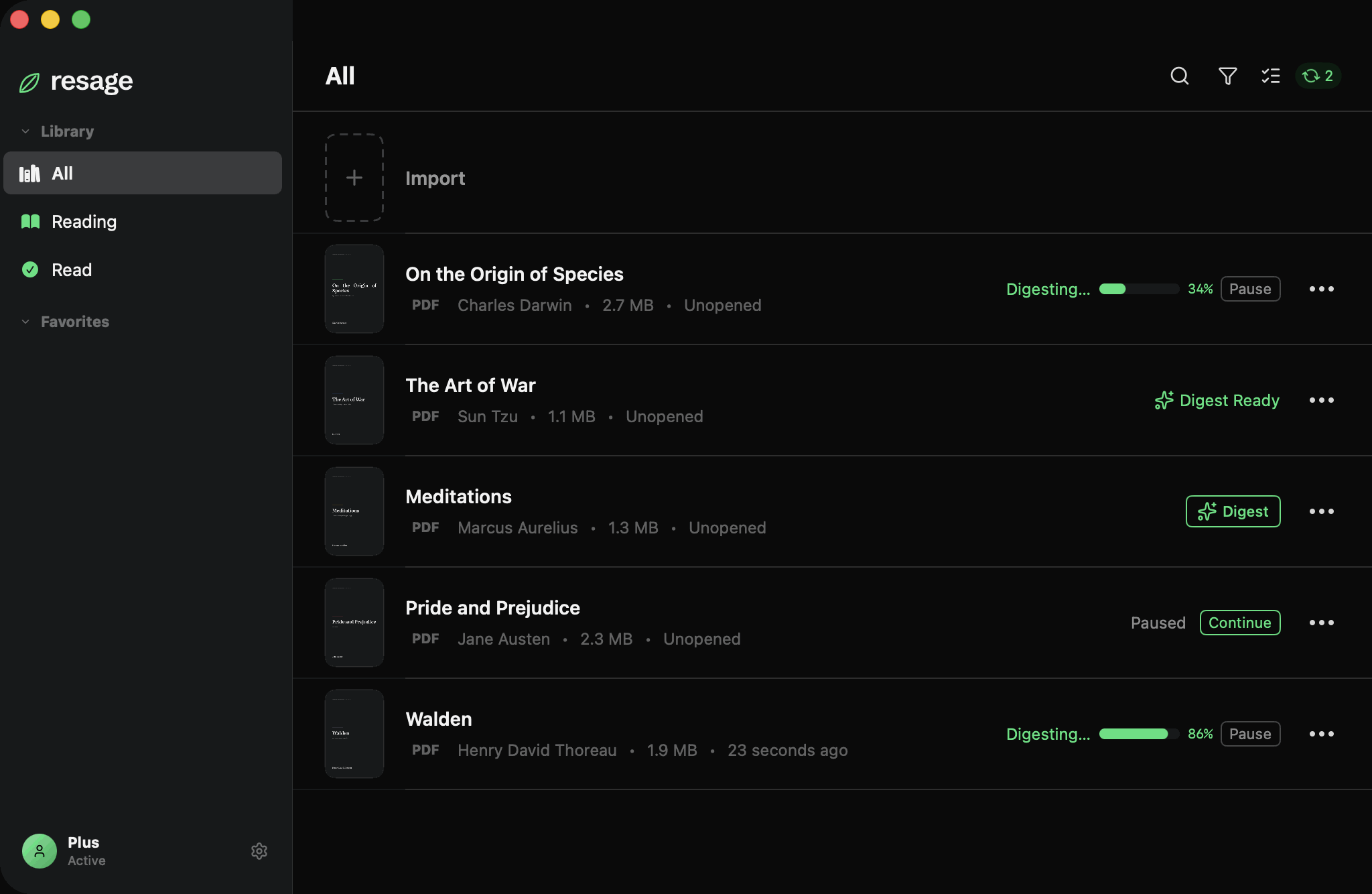
Tap Digest and Resage reads through your whole file on your Mac — scanned pages recognized automatically, no OCR tools to fiddle with.

After that, turn to any page and discuss the entire file, not just what's on screen. A green ✦ marks the files it has read.

Digest runs locally on your Mac. Your file is never uploaded.

Your files never leave your device.

Your files stay on your Mac and in your own iCloud. Search and Digest run on-device; only the few passages needed to answer a question are ever sent — and used only to answer.

We never train models on your files. Ever.

Private by architecture, not just by policy.

Under the hood

How it works: Private by architecture

On your Mac

1

Import

Parsed entirely on your Mac; the file itself never leaves your device.

2

Digest

Scanned pages recognized on-device (Apple Vision OCR); the full text is chunked and vector-indexed, also on-device.

Privacy boundary

In the cloud

3

Discuss

Your question + only the few matching passages + your reading profile go to the AI; it can pull more itself — table of contents and full-text search.

Find it again

Search what you read, and what you asked.

One query across the text and every discussion you have had with it.

Resage unified search — one query across the text and your past discussions

Not just the document.

Every reader can search a document. Resage also searches the conversations you had about it — so the question you asked three weeks ago is as findable as the paragraph that prompted it.

One shortcut, one box. Results come back grouped by where they came from.

Your questions are part of the file now.

What you asked about a document is often the fastest way back into it. Resage keeps that alongside the text instead of burying it in a chat history you have to scroll.

Your library

Everything you build here is yours to keep.

Syncs through your own iCloud.

Your files — recognized, indexed, digested and all — sync through your own iCloud. Open any of your Macs and pick up right where you left off. Nothing passes through our servers.

When iPhone arrives, it reads from the same iCloud.

Back up a file as a single .resage.

Export anything you're reading as one .resage file — the text, the recognized pages, your highlights and your reading progress, all baked in. Yours to keep, move between Macs, or archive.

A file you own — not locked inside an app.

Features

Everything it does

Jump to the page

Answers cite pages. Tap a citation and the reader jumps right there to follow the thread without losing your place.

A memory of you

A private learner profile based on three layers of memory that compounds across sessions and files, fading guesses as you go.

Digest

One-tap complete scan: recognizes scanned PDFs automatically (OCR) and vector-indexes the whole text for book-wide discussions.

Original-layout PDF reader

Fixed page layout with zoom, continuous scrolling, double-page view, and three appearance modes.

Grounded, honest answers

Answers are anchored to the actual page. When the AI is unsure, it will admit its limitations.

100+ languages to discuss

Read and discuss files in whatever language you write in, with scanned OCR support for 30+ languages.

iCloud sync

Your entire library syncs through your own private iCloud storage, never passing through our servers.

.resage single-file backup

Export anything you read as a single independent file containing recognized text, highlights, and progress.

Private by architecture

Engineered so your original documents never leave your local Mac hardware.

Free to start

Each week brings a limited discussion allowance. Resage Plus gives you more discussions.*

How it compares

Built for reading, not for one-off answers.

ResageNotebookLMChatGPTApple Books
A real reader — original layout, pages, bookmarksYesNoNoYes
Learns how you read, compounding across filesYesNoNoNo
Remembers progress & every discussion, across sessionsYesPartly (per notebook)Partly (per project)
Stays sharp over months — memory, not one endless chatYesNoNo
Answers grounded in your file, says so when unsureYesYes (citations)Weak
Files stay on your deviceYesUploadedUploadedYes
A profile of you that you can see and correctYesNoNo
Scanned files recognized automatically, on-deviceYesNoNoNo

Read the full comparisons →

Questions

Frequently asked

What is Resage?

Resage is a Mac reading app with an AI reading companion that learns how you read. You read your own files; it reads alongside you, anchored to the text, and gets more useful the more you use it.

How is it different from ChatGPT or NotebookLM?

Those answer questions statelessly and forget you between sessions. Resage keeps a private learner model that compounds across your files, and grounds every answer in your actual file instead of the model's general memory of it.

What files can I import?

Resage reads PDF, EPUB, Word, TXT, Markdown, and Kindle (MOBI, AZW3) files. PDFs keep their original layout; other formats reflow to fit your screen.

Are my files private?

Your files stay on your Mac and your own iCloud. We never upload the whole file, and never train models on your content.

Can I back up my library or move it between Macs?

Yes. Your library syncs through your own iCloud, so it's ready on every Mac you sign into. You can also export anything you're reading as a single .resage file — text, recognized pages, highlights and reading progress included — to keep or move yourself.

What about scanned PDFs?

Resage recognizes the text on your Mac automatically, as part of Digest — no buttons, no tools to fiddle with. It'll flag a scanned page as recognized text, so you know when to double-check.

What languages does it support?

The interface ships in English and Chinese, with more to come. You can discuss your files in whatever language you write in.

Does it need my Mac?

Version one is a Mac app. Digest — and recognizing scanned pages — runs locally on your Mac. iPhone is coming next.

How much does Resage cost?

Free to start, with a limited weekly discussion allowance. Resage Plus gives you more discussions* — $4.99/month, or $39.99/year (about $3.33/month). Importing, reading, read-through and text recognition are never metered — your allowance is spent only on discussions.

How is my allowance used up?

Only discussions draw on it, and not all cost the same: a quick question about the current page uses the least, while questions that search a whole chapter, the entire file, or several files for evidence — or that need careful enumeration and cross-checking — use a bit more. The AI decides this automatically, and you can see your remaining percentage anytime in the app's Settings.

Still have a question? Visit the Help Center.

Start reading

Read anything. It learns you as you go.

Import your first file and see how it reads. Free to start.

Download Resage for Mac

Free to start — macOS 14.0+, Apple Silicon