Does Kindle's Ask this Book work with your own files?
Amazon's Ask this Book brought AI discussions to Kindle — but only for books bought from Amazon on 2024+ hardware. Here is what happens when you want that same conversational depth on your own EPUBs, PDFs, and DRM-free books on Mac.
Updated August 2026
When Amazon launched Ask this Book (alongside "Story So Far" and chapter recaps), it proved something important: having an AI assistant right where you read is genuinely useful. Asking what happened three chapters ago or clarifying a dense argument without leaving the reader makes books more accessible.
However, Amazon's implementation came with three hard boundaries. First, it only works on books purchased or borrowed through Amazon's Kindle Store — personal documents, sideloaded EPUBs, and PDFs from outside the store are completely ignored. Second, it is locked to newer hardware released in 2024 and later. Third, authors and publishers were given no ability to opt in or opt out, sparking public concern from the Authors Guild over copyright, data ingestion, and model training.
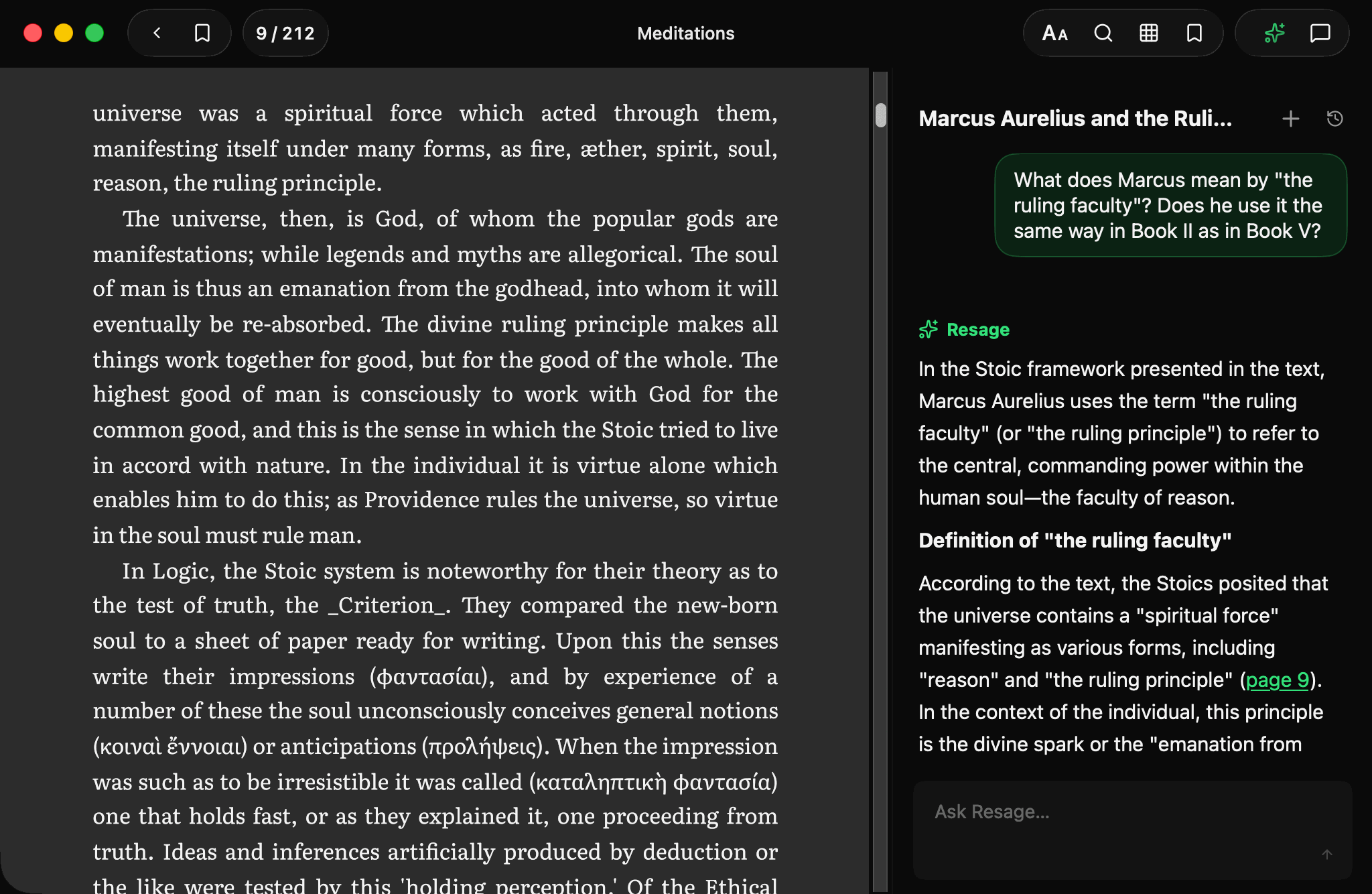
Resage is built from the ground up for a different premise: you should be able to read and discuss any file you legitimately own, with full-page fidelity and explicit AI-consent privacy controls.
The short version
Walled catalog AI vs your personal library
| Resage | Kindle Ask this Book | |
|---|---|---|
| Calm, full-page reader | Yes — native Mac reader | Yes — e-ink & mobile app |
| Your own EPUBs & PDFs | Yes — first-class support | No — store titles only |
| DRM-free MOBI & AZW3 files | Yes — direct import | No AI on sideloaded files |
| Hardware requirement | Any Apple Silicon Mac (macOS 14+) | 2024+ Kindle hardware only |
| Privacy & storage | Cloud preparation with AI consent | Amazon cloud storage |
| Model training on your reading | Never — zero training on user text | Unclear / no author opt-out |
| Compounding memory across books | Yes — memory across your library | No — isolated to single title |
| Scanned PDF text recognition | Yes — cloud preparation with AI consent | No |
| Price | Free to start; Plus $9.99/mo, Pro $29.99/mo | Included with book purchase |
The three gaps in Amazon's walled garden
Amazon's reading features are designed to serve Amazon's storefront. That creates three immediate pain points for readers who bring their own material:
- 1. The format & catalog wall: If you bought an EPUB from an independent bookstore, downloaded a public-domain classic from Standard Ebooks, or read academic PDF preprints from arXiv, Ask this Book is absent. Amazon's "Send to Kindle" service converts your files for reading, but deliberately excludes them from AI discussion and recap features.
- 2. Planned obsolescence for hardware: Despite the AI responses generating on remote cloud servers, Amazon restricted Ask this Book to 2024 and newer Kindle devices (such as the 2024 Paperwhite, Colorsoft, and Scribe). If you own an older Oasis, Voyage, or standard Paperwhite, you are left out.
- 3. The Authors Guild controversy & author consent: In December 2025, the Authors Guild publicly issued a statement questioning Amazon's rollout of "Ask this Book." Authors and publishers were never asked for permission to ingest their books into the AI pipeline, nor given an opt-out mechanism. This raised serious concerns across the literary community regarding fair use, copyright boundaries, and opaque AI ingestion.
How Resage approaches your reading
Resage is not an e-commerce storefront with an AI layer. It is a dedicated Mac reader built for the files you already own:
On Mac, iPhone, and iPad, newly imported books are uploaded for cloud preparation after you agree to AI data processing. There is no separate cloud-processing switch or local Digest option. Temporary uploaded originals are deleted when processing finishes, or within seven days if it cannot complete. Without AI consent, you can read with lightweight local parsing and no cloud-preparation upload. Existing books are not reprocessed automatically. When you ask a question, relevant passages are sent to the AI provider. Your content is never used for model training.
Native support for your formats: Resage opens PDF (preserving the exact fixed layout, columns, and diagrams), EPUB, Word (DOCX), TXT, Markdown, and DRM-free MOBI and AZW3 files. With AI consent, scanned pages are recognized during cloud preparation.
Memory that compounds: Instead of ephemeral summaries that vanish when you close a book, Resage remembers your conversations, including the passages they quote, in your account. It remembers what you asked, where you got stuck, and which explanations resonated with you. That carries across every book and paper in your library, and you can turn memory off or clear it at any time in Settings.
A note on DRM and legal boundaries
Resage strictly respects copyright and digital rights management. Resage does not strip, bypass, or remove DRM from copy-protected files. Books purchased with Amazon's proprietary DRM cannot be opened in Resage (no third-party app can legally open them). Resage is built for your open-format EPUBs, PDFs, personal documents, and DRM-free MOBI and AZW3 files.
Where Kindle Ask this Book wins
- Integrated e-ink hardware: If you read exclusively on a 2024+ Kindle e-reader in direct sunlight, Amazon's built-in feature offers convenient, battery-friendly access without carrying a laptop.
- No added subscription cost: Ask this Book is included directly with eligible Amazon Kindle purchases and titles from Amazon's subscription reading programs.
- Spoiler-free fiction recaps: Amazon's "Story So Far" feature is specifically tuned for popular fiction titles in their store to catch up on plot points up to your current reading percentage.
The verdict
Pick Resage if…
- You read your own files — EPUBs, PDFs, research papers, and DRM-free ebooks
- You want reading with explicit AI-consent controls where files never train AI models
- You want an AI companion that remembers you across all your books
- You read on a Mac
Pick Kindle Ask this Book if…
- You purchase all your reading material directly from the Amazon Kindle Store
- You read on a 2024 or newer Kindle e-reader device
- You only want brief plot recaps and character catch-ups for store fiction
- You don't need to discuss PDFs, academic papers, or personal documents
Common questions
Can I use Kindle's Ask this Book on my own EPUB or PDF files?
No. Amazon's Ask this Book, Story So Far, and Recap features only work on eligible titles purchased or borrowed through the Amazon Kindle Store. Sideloaded documents and personal files sent via Send to Kindle do not support Ask this Book. Resage is designed specifically to fill this gap, providing page-anchored AI discussions on your own EPUBs, PDFs, Word documents, and DRM-free files.
Why doesn't Ask this Book work on older Kindle devices?
Amazon restricted Ask this Book to hardware released in 2024 and later (such as the 2024 Paperwhite, Colorsoft, and Scribe), even though the AI generation happens in the cloud. Older Kindle devices do not receive the feature. Resage runs natively on any Apple Silicon Mac running macOS 14.0 or newer.
Can Resage open DRM-protected Kindle books?
No. Resage does not remove or bypass DRM protection. Books purchased with Amazon's proprietary DRM cannot be opened. However, DRM-free MOBI, AZW, and AZW3 files work seamlessly in Resage alongside EPUBs and PDFs.
How does Resage handle privacy compared to Amazon's AI features?
On Mac, iPhone, and iPad, newly imported books are uploaded for cloud preparation after you agree to AI data processing. There is no separate cloud-processing switch or local Digest option. Temporary uploaded originals are deleted when processing finishes, or within seven days if it cannot complete. Without AI consent, you can read with lightweight local parsing and no cloud-preparation upload. Existing books are not reprocessed automatically. Relevant passages are sent for AI answers, and your content is never used to train models.
Also comparing: Resage vs NotebookLM Resage vs ChatGPT Resage vs Apple Books Resage vs Readwise Reader
Start reading
Read your files. It learns how you read.
Import your first EPUB or PDF and discuss it from the page you are on. Free to start.
Free to start — macOS 14.0+, Apple Silicon