Resage vs Apple Books
We'll say it first: Apple Books is the reader Resage looks up to — calm, beautiful, free. This comparison isn't about beating it. It's about what happens when that kind of reading meets an AI that learns you, and what each app does with the files you bring yourself.
Updated July 2026
Most comparisons on this site are between different shapes of tool. This one is between relatives. Apple Books got the important things right years ago: full pages, quiet chrome, your position and highlights synced through iCloud, nothing between you and the text. Resage is built on the same conviction — the page is sacred, and software should stay out of the way.
Two things separate them. First, what happens when you have a question — in Apple Books, the answer is "leave the app." Second, what counts as a file worth reading — bring your own PDF to Apple Books and it quietly hands it off to Preview; bring a Kindle-format file and it won't open at all.
The short version
Two calm readers, one of them listens
| Resage | Apple Books | |
|---|---|---|
| Calm, full-page reading | Yes | Yes |
| Your own PDFs | Read natively, original layout | Handed off to Preview |
| Kindle formats (MOBI / AZW3) | Imports them | No |
| Scanned files | Recognized during cloud preparation with AI consent | No |
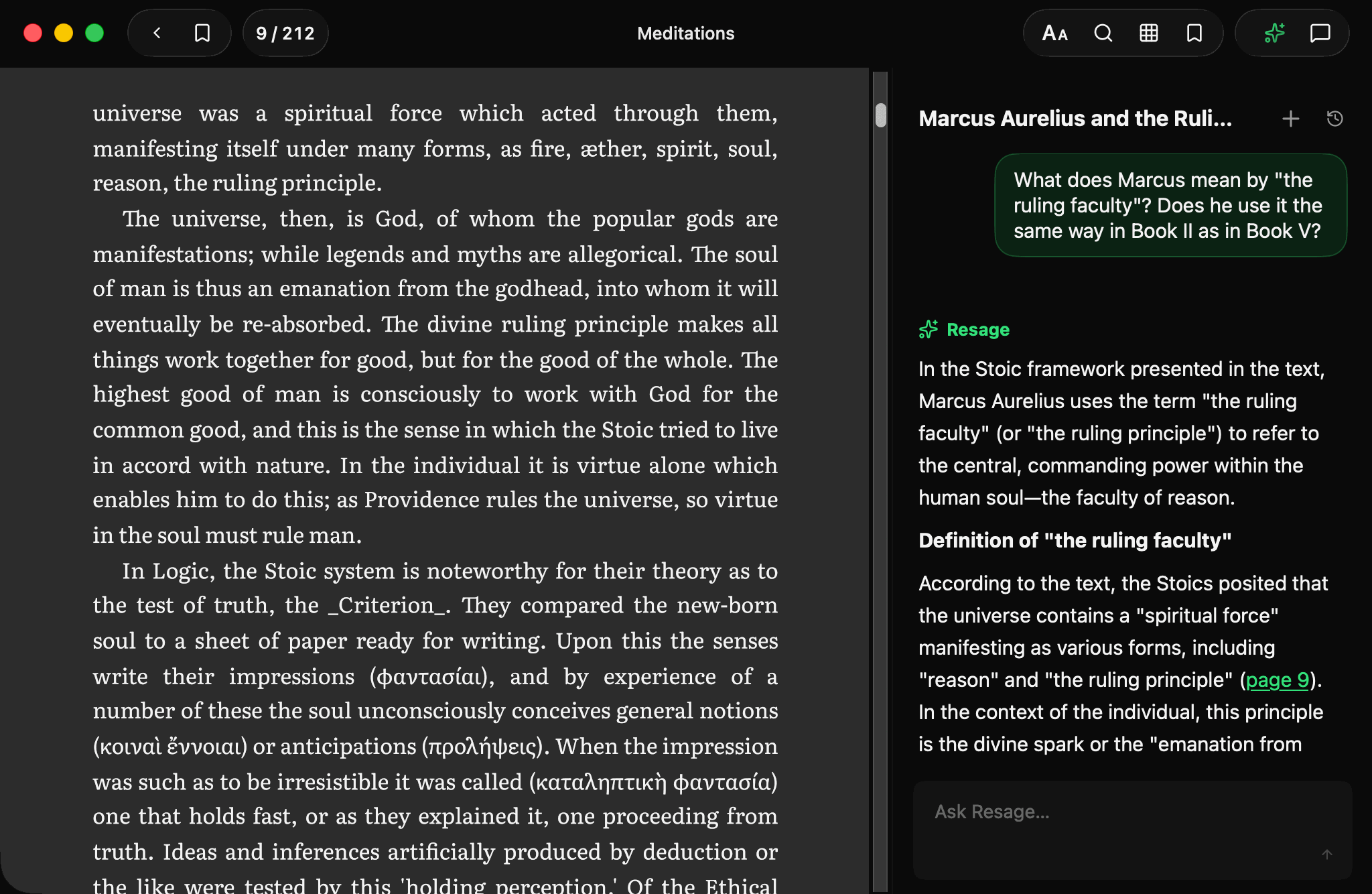
| Discuss what you're reading | Yes — anchored to the page | No AI at all |
| Learns how you read | Yes — memory across your files | No |
| Where your files go | Cloud preparation after AI consent, original deleted when done | Stays on device |
| Store, audiobooks, every Apple device | Mac, iPhone and iPad only, no store or audiobooks | Yes |
| Price | Free to start; Plus $9.99/mo, Pro $29.99/mo | Free |
The question you can't ask
Reading anything serious generates questions — a term you don't know, an argument that lost you, a reference to something three chapters back. In Apple Books, every one of those means leaving: to a browser, to a chatbot, to somewhere you'll retype or paste what you were looking at, and then find your way back to the page.
In Resage the question happens on the page. A quiet bar at the bottom; select a sentence and discuss exactly that sentence; answers that quote the text and link the page they came from. When you don't have a question, Resage looks a lot like Apple Books — which is the point. The AI layer costs you nothing until the moment you want it.
Your own files, first-class
Apple Books is at its best with EPUBs — especially ones from its store. Your own files get a colder welcome: an imported PDF doesn't open in Books' reading view at all; macOS hands it to Preview. A scanned PDF is just pictures. A MOBI or AZW3 from your Kindle days won't import.
Resage treats whatever you bring as the main event: PDF in its original layout, EPUB, Word, Markdown, TXT, and Kindle-format files. With AI consent, scanned pages are recognized during cloud Digest. If your library is files you've gathered rather than books you've bought, this difference is daily.
Highlights vs understanding
Apple Books remembers your position, bookmarks and highlights — a record of where you've been. Resage additionally builds a record of how you read: what you understand, where you got stuck, which explanations landed. Every discussion feeds it, it carries across every file in your library, and you can read and correct all of it. Apple Books on day 300 treats you exactly as it did on day 1. That's fine for a reader; it's the gap Resage exists to close.
Where Apple Books wins
- It's free. Completely. Resage's reading is free too, but its discussion layer has a monthly allowance, with more on Plus.
- The store and audiobooks. Buying, borrowing, listening — Resage has no store and no audiobooks, by design.
- Every Apple device. iPhone, iPad, Watch, Vision Pro, CarPlay. Resage is on Mac, iPhone and iPad.
- Purchased, copy-protected books. Store purchases are locked to Apple's apps — Resage can't open them (no app can, legally).
The verdict
Pick Resage if…
- Your reading is files you bring — PDFs, EPUBs, scans, Kindle-format files
- You have questions while you read, and want them answered from the text
- You want your reading to compound — an AI that knows you better each month
- You read on a Mac
Pick Apple Books if…
- You buy your reading from Apple's store, or listen to audiobooks
- You want zero AI anywhere near your reading
- You read on Apple Watch, Vision Pro or in CarPlay
- Free matters more than any feature
And of course, they coexist happily on the same Mac: store purchases in Apple Books, everything you gather yourself — and everything you want to actually discuss — in Resage.
Common questions
Can Resage open files I bought in Apple Books?
Store purchases are typically copy-protected (DRM), and Resage can't open those. Anything you own without DRM works — PDF, EPUB, Word, Markdown, TXT, and Kindle-format MOBI/AZW3 files, which Apple Books won't take at all.
Does Apple Books have any AI features?
As of July 2026, Apple Books itself has no AI reading features — no discussion, no summarization, no memory beyond position and highlights. A deliberate, and lovely, classic reader.
Do both keep my files private?
Both keep your files private from other users, but they work differently. Apple Books syncs through your own iCloud. Resage syncs through your Resage account and, with your AI consent, prepares files in the cloud. The difference is what happens while you read: Apple Books leaves you alone; Resage can discuss the text, sending only the few passages needed to answer.
Also comparing: Resage vs NotebookLM Resage vs ChatGPT Resage vs Readwise Reader
Start reading
Read anything. It learns you as you go.
Import your first file and see how it reads. Free to start.
Free to start — macOS 14.0+, Apple Silicon